
 I am currently spending a lot of my time in a collaborative writing project with my friend and colleague Bill Schiano – the details are not important at this point, but it is a book-length, somewhat complicated piece of text, and involves an editor. Bill is in Boston and I am in Oslo, usually a six-hour time difference. A relatively short deadline has necessitated finding a way to work together which is faster than the time-honored method of e-mailing drafts back and forth. Shouldn’t be hard in this day and age, with cloud-based software and 60-megabit Internet connections, right?
Well, it is. We started out with Google Docs, which is great for quickly setting up shared documents fast and handles multiple concurrent editors (you can actually see the other person writing almost in real time.) However, it turns out it lacks some of the nicer interface details of good old Word, such as comments in bubbles and a lot of the keyboard shortcuts. It also quickly gets very unwieldy as the document gets longer.
We then tried out Scrivener, an authoring (as opposed to word processing) tool which recently has become available for Windows and is touted as the best thing since sliced bread by a number of authors. We found it to be fantastic for authoring – if you are a single author. For two or more people working together (over a DropBox-shared directory) it lacks the version tracking and commenting features, meaning that we would have to be very disciplined about who wrote what where and have lots of supporting documents a la “Unifinished issues”. After a few screw-ups, we decided to try something else.
We then came up a with solution that really works, which we have been using for a few months now and gives us nearly everything we want: The venerable and much-maligned Microsoft Word. The difference is that the document we work with (which currently stands at 157 pages, nearly 63000 words, just over a megabyte storage) is stored on Microsoft OneDrive, and we can both edit it using Word on our computers. I will leave the actual setup of this as an exercise for the reader, but the short version is that you set up a OneDrive account at onedrive.live.com, open a new document in Word (must be at least the 2010 version) and save it to OneDrive. You then share by sending a link to your co-author, who opens the link and can then choose to edit it online (i.e., through a browser) or in Word on his or her own machine.
This gives us the best of both worlds. We can edit the document on our own machines, see the changes the other has made and accept them, write comments in the text that the other person can respond to. We do Skype meetings (with Skype Premium, so we can share screens) about twice per week to discuss things we cannot fix simply by shared editing, and the whole thing is progressing quite nicely.
As usual when you start using an old tool for something new, you learn a few tricks you hadn’t thought about – the best way to learn new tricks is always to watch someone else using the software: I learned that you can control-click on an item in the TOC to go directly to it by seeing Bill do it, and he learned that you can grab selected text pieces and drag them to new places (without doing Ctrl-x Ctrl-v.) That’s why I think every group working together should have an occasional “Tips and tricks swap meet.”
We have found that working with a large (at least 27”) screen as your primary tool is immensely useful. That allows a full-page view with two full pages and a navigation pane, like this:
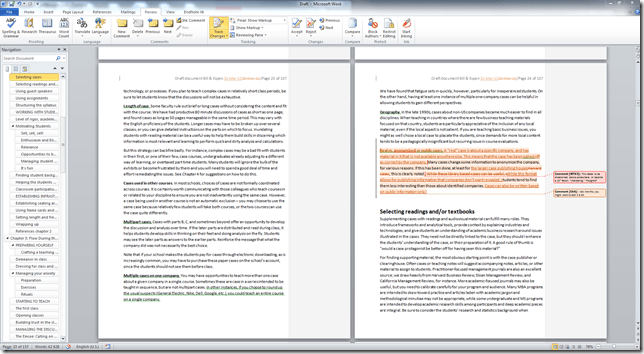
If you are disciplined about heading styles (i.e., chapter headings being “Heading 1” etc.,) then the navigation pane works more or less like the outline or slide sorter in PowerPoint, allowing you to drag and drop chapters and sub-chapters around and promote or demote them, which is extremely useful when your work approach is to bung in a lot of text in sub-chapters and then sort out the structure later. (Word is a bit irritating in its use of styles, though – it should be easier to enforce a standard style set, unchanged when text is clipped in from other sources.)
Another useful trick is to go to the File>Recent screen, locate the shared draft, and press the little push-pin to the left of it. This places the document permanently at the top of your Recent files list – making it very easy to open without having to go to OneDrive etc. (Note 2014-01-9: This seems to only work on the Windows version of Office, not on the Mac. Another reason to get Parallels.)
When working together like this, you also need to come up with a shared notation for work – how to you mark some text as tentative, for instance. The standard comment and track changes settings are OK (but change the standard for Track Changes so it does not track changes in formatting) but you need more than that. We have defaulted to marking spurious text with {curly brackets} and reference points with “zzzz”. (I have heard other writers, such as Cory Doctorow, use “tk” because that particular letter combination does not appear often in the English language, unless you write about the Atkins diet.) The idea is that even with a large document, you can search through it until you have fixed all issues, i.e., gotten rid of all the curlies and zzzz’s.
There are, of course, a few issues you need to deal with. That a document is shared does not mean it is backed up, so we both do local, dated backups every now and then, just to stay on the safe side. The more users are editing the document, the slower it updates, so we try to be disciplined about a) saving often, and b) exiting the document when we are not editing it. If not (as Bill found when Espen had done a lot of small edits and then, in Norway, gone off to bed while leaving the unsaved document on his workstation,) the edited paragraphs become inaccessible to the other author. So, save and exit whenever you can.
And that’s it so far – just sharing experiences here, but this approach really works. Our next challenge is bringing our editor on board – so far we have been sending him chapters as they have become ready. I am now going to set this up for collaboratively writing with a couple of other colleagues, on shorter pieces, and we’ll see how that goes.
Keep you posted – and tips and tricks are appreciated!
Update 2014/4/30: SkyDrive has become OneDrive, so I have adjusted for that.
UPdate 2016/7/18: You can now open a document in Word using Google Chrome.





 New England has just had a snowstorm, predicted to be of historic proportions, but eventually ending up, as always, as nothing much, except a staggeringly incompetent number of people (400,000 or so in Massachusetts alone) losing power. As a Norwegian currently in Oslo (but with nine winters in Boston (Arlington and Brookline)): New England snowstorms, despite their ferocity, are not aberrations of nature but a failure to prepare a systemic level.
  The fact that New England panics every time there is a flurry is due to lack of preparedness at the infrastructure level. In most of Norway power and telephone lines are underground, it is illegal not to have snow tires on your car after December 1st or thereabouts (if you drive in the snow with regular tires and go in the ditch, you are fined quite severely) and during my own and my children’s school days we have never had a snow day or any other interruption due to the weather (and we have plenty of weather). In Norway you cannot get a driver’s license without passing a driving-on-slick-surface course. The Oslo subway (or buses – what kind of drivers to you have?) has never been closed due to snow. I have never been to the store to stock up on batteries and water. (I have been to the gas station to buy gas for the snow blower ahead of a storm, though.) Our airport does not close down for snow, though there can be delays. In New England, there are public service announcements (from Thomas Menino’s office) saying “When clearing motor vehicles, remove snow around the muffler/exhaust system before starting the car”. How stupid can you get?
  I just can’t get used to the New England oh-my-God-here-it-comes-again-flip-to-channel-5 attitude. I attribute this to lack of far-sightedness in planning – rather than taking the cost of modernizing the power grid and change the telephone lines to fiber all around, incrementalism wins. (Then again, I have found myself being the only driver (in a VW Vanagon with worn tires) on the 128, and the only person coming in to work (in a Chevy Caprice).) Instead of driving responsibly you salt the roads until they are white and dogs can’t go out due to the pain the salt inflicts on their paws. Instead of having a public works division outfitted to fix things with proper equipment you resort to an army of contractors with F-250s barging out to power-plow 2 inches of wet snow that will disappear at 9am the next day anyway, just to get paid.

 . Boston, MA, Harvard Business School Press.) a few years later, with less theory and more application. Based on interviews with a number of university presidents as well as their garbage can model, they discuss the nature of getting things done in a university environment, where there is ambiguity of purpose, power, experience and success. They finish with a list of eight basic tactics for getting things done – probably at the instigation of Harvard Business School Press, which primarily caters to business people and want applicability, not just description.
 I recently got myself an iPhone 5 – despite researching technology, I am rather slow in adopting it. One advantage of never throwing old technology away, however, is that accessories sometimes work – and I just discovered that my old Think Outside bluetooth keyboard works, originally intended for my Palm Pilot V, may it rest in peace, work rather nicely with the iPhone. (Here’s
  Peter G. Neumann is one of my heroes – a computer science and security expert with a sense of humor (his dry comments on the Risks Digest are legendary), inventive solutions to problems (he once built a keyboard with two pedals (for “alt” and “ctrl”) to deal with carpal tunnel syndrome) and far-reaching views on most things. He is currently