
Category Archives: Nerdy ruminations

The disrupted history professor

Jill Lepore, Harvard HistorianProfessor Jill Lepore, chair of Harvard’s History and Literature program, has published an essay in the New Yorker, sharply critical of Clayton Christensen and his theory of disruptive innovations. The essay has generated quite some stir, including a rather head-shaking analysis by Will Oremus in Slate.

I find Lepore’s essay rather puzzling, and, quite frankly, unworthy of a professor of history, Harvard or not. At this point, I should say that I am not an unbiased observer here – clayClay is a personal friend of mine, we went through the doctoral program at Harvard Business School together (he started a year before me), he was on my thesis committee (having graduated three years ahead of me) and we have kept in touch, including him coming to Norway for a few visits and one family vacation including a great trip on Hurtigruten. Clay is commonly known as the “gentle giant” and one of the most considerate, open and thoughtful people I know, and seeing him subjected to vituperating commentary from morons quite frankly pains me.

Professor Lepore’s essay has one very valid point: Like any management idea, disruptive innovation is overapplied, with every technology company or web startup claiming that their offering is disruptive and therefore investment-worthy. As I previously have written: If a product is described as disruptive, it probably isn’t. A disruptive product is something your customers don’t care about, with worse performance than what you have, and with lower profit expectations. Why in the world would you want to describe your offering as disruptive?

That being said, professor Lepore’s (I will not call her Jill, because that seems to be a big issue for some people. But since I have met Clay (most recently last week, actually), I will refer to him as Clay)  essay shows some remarkable jumps to non-conclusions: She starts out with a very fine summary of what the theory of disruption says:

Christensen was interested in why companies fail. In his 1997 book, “The Innovator’s Dilemma,” he argued that, very often, it isn’t because their executives made bad decisions but because they made good decisions, the same kind of good decisions that had made those companies successful for decades. (The “innovator’s dilemma” is that “doing the right thing is the wrong thing.”) As Christensen saw it, the problem was the velocity of history, and it wasn’t so much a problem as a missed opportunity, like a plane that takes off without you, except that you didn’t even know there was a plane, and had wandered onto the airfield, which you thought was a meadow, and the plane ran you over during takeoff. Manufacturers of mainframe computers made good decisions about making and selling mainframe computers and devising important refinements to them in their R. & D. departments—“sustaining innovations,” Christensen called them—but, busy pleasing their mainframe customers, one tinker at a time, they missed what an entirely untapped customer wanted, personal computers, the market for which was created by what Christensen called “disruptive innovation”: the selling of a cheaper, poorer-quality product that initially reaches less profitable customers but eventually takes over and devours an entire industry.

She then goes on to say that the theory is mis- and overapplied, and I (and certainly Clay) couldn’t agree more. Everyone and their brother is on an innovation bandwagon and way too many consulting companies are peddling disruption just like they were peddling business process reengineering back in the nineties (I worked for CSC Index and caught the tail end of that mania. Following this, she points out that Clay’s work is based on cases (it is), is theory-building rather than theory-confirming (yep) and that you can find plenty of cases of things that were meant to be disruptive that weren’t, or companies that were disruptive but still didn’t succeed. All very well, though, I should say, much of this is addressed in Clay’s later books and various publications, including a special issue of Journal of Product Innovation Management.

(Curiously, she mentions that she has worked as an assistant to Michael Porter‘s assistant, apparently having a good time and seeing him as a real professor. She then goes on to criticise the theory of disruptive innovation as having no predictive power – but the framework that Porter is most famous for, the five forces, has no predictive power either: It is a very good way to describe the competitive situation in an industry by offers zero guidance as to what you actually should do if you are, say, in the airline industry, which scores very badly on all five dimensions. There is a current controversy between Clay and Michael Porter on where the Harvard Business School (and, by implication, business education in general) should go. The controversy is, according to Clay, mostly “ginned up” in order to make the Times article interesting, but I do wonder what professor Lepore’s stakes are here.)

The trouble with management ideas is that while they can be easily dismissed when commoditized and overapplied, most of them actually start out as very good ideas within their bounds. Lepore feels threatened by innovation, especially the disruptive kind, because it shows up both in her journalistic (she is a staff writer with the New Yorker) and academic career. I happen to think that the framework fits rather well in the newspaper industry, but then again, I have spent a lot of time with Schibsted, the only media company in the world that has managed to make it through the digital transition with top- and bottom-line growth, largely by applying Clay’s ideas. But for Lepore, innovation is a problem because it is a) unopposed by intellectuals, b) happening too fast, without giving said intellectuals time to think, and c) done by the wrong kind of people (that is, youngsters slouching on sofas, doing little work since most of their attention is spent on their insanely complicated coffee machines, which “look like dollhouse-size factories”.) I am reminded of “In the beginning…was the command line.”, Neal Stephenson‘s beautiful essay about technology and culture, where he points out that in

… the heyday of Communism and Socialism, [the] bourgeoisie were hated from both ends: by the proles, because they had all the money, and by the intelligentsia, because of their tendency to spend it on lawn ornaments.

And then Lepore turns bizarre, saying that disruptive innovation does not apply in journalism (and, by extention, academia) because “that doesn’t make them industries, which turn things into commodities and sell them for gain.” Apparently, newspapers and academia should be exempt from economic laws because, well, because they should. (I have had quite a few discussions with Norwegian publishing executives, who seem to think so for their industry, too.)

I think newspapers and academic institutions are industries – knowledge industries, operating in a knowledge economy, where things are very much turned into commodities these days, by rapidly advancing technology for generating, storing, finding and communicating information. The increased productivity of knowledge generation will mean that we will need fewer, but better, knowledge institutions. Some of the old ones will survive, even prosper. Some will be disrupted. Treating disruptive innovation as a myth certainly is one option, but I wish professor Lepore would base that decision on something more than what appears to be rhetorical comments, a not very careful reading of the real literature, and, quite frankly, wishful thinking.

But I guess time – if not the Times – will show us what happens in the future. As for disruption, I would rather be the disruptor than the disruptee. I would have less money and honor, but more fun. And I would get to write the epitaph.

But then again, I have an insanely complicated coffee machine. And now it is time to go and clean it.

Turning the 77 bus electric

I am currently back in Boston, have visited my friends at MIT and will go to a reunion at HBS tomorrow. The weather has been great and it is just fun to visit old friends again.

But hey, this is product review. I have just purchased a set of Bose QuietComfort 20i Acoustic Noise Cancelling Headphones (or, rather, earbuds) which are rather impressive. I already have the noise cancelling headphones and love them for air travel, but the earbuds can be used in many more circumstances.

77 busAnd yesterday I had to take the 77 bus (Arlington Heights) from Harvard Square’s underground bus stop, an area seemingly designed to put people off public transportation. The MBTA uses old diesel buses (I think they literally are the same ones I took in the early nineties as a grad student, at least they don’t seem to have upgraded the technology) and the noise level is fantastic.

So, as I was waiting for the bus, I decided to try out my newly acquired earbuds, plugged them into my iPhone, turned on Spotify and selected Steely Dan’s Babylon Sisters. The noise instantly disappeared, and Steely Dan’s perfectly engineered music sounded not unlike it would in a perfect environment.

And here is the catch: When the bus finally arrived, I looked at it driving up and for a fleeting second thought “Hey – they made them electrical now!” Then, of course, better judgement prevailed, but as a testament to the noise cancelling qualities of the earbuds, it says something.

The rest, of course, is silence…

Double!

Espen-Double

Here (photo: Lene Pettersen) is my last addition to my nerd kit: A Double from Double Robotics. I suppose this is formally defined as a telepresence robot, but a simpler way to describe it is to say that it is an iPad stuck on a Segway.

I spent most of Friday fiddling around with it, exploring what it can do. It is surprisingly natural in use: It can be raised (up to about five feet) and lowered, depending on whether you want to speak to someone standing or sitting. I drove it around the BI building, and quickly found that dead network spots (it needs a constant Internet connection to work) are problematic. Also, it is not very good at switching between routers on the same wireless network – it loses connection and needs a couple of minutes to find it again. I’ll probably have to get an iPad with a 4G connection, if such a thing exists (on the other hand, with a 4G connection I could send it out of the building and down the street.) Another problem was weak sound – in a room with other people speaking, the iPad speaker is too weak. I might have to get some small battery-powered speakers and Velcro them to the kit. elevators, doors and door sills, of course, are tricky.

Here are some pictures from a little excursion around the school library (photo: Martin Uteng, Instagrammed here.). A little tricky to talk to the students (again, not enough volume) and some network issues, but at least I am getting better at driving it:

IMG_2157

IMG_2144

(Yes, this is actually research. And fun at work.) The use cases for a Double are several – I could advise students and go to meetings without leaving my home office, for instance. I have done that with Skype and other video conferencing tools for ages, but this thing is much less formal and allows you to putter around and talk to people. one of my colleagues has severe allergies and spends the spring as a pollen refugee in his mountain cabin – I am sure he would love to borrow it.

Compared to a picture on a computer or projection screen this little robot is much more intuitive and humanoid – you can see in which direction it is looking, for instance. I have been told that there are a bunch of these at Stanford, and that at first they were meant to be shared – but it turns out that people want their own, so they can personalize it as I have done with the ugliest bow tie I could find. My colleagues tell me it feels much more natural to speak to me through the Double than through Skype – it is almost as if I am there.

So, some technicalities left to resolve, but this has promise. I am already scheduled to give a talk through it, while I am in the States. And yes, I have already been compared to Sheldon Cooper of The Big Bang Theory. Several times…

Professor BowTie

My Chinese students (in the BI-Fudan “best-of-both” MBA program) refer to me as “Professor Bow Tie), for obvious reasons (though not in my presence – there, I am “Professor Espen”). On a couple of occasions, they have even showed up wearing bow ties themselves – and looking out over a room with 60 bow ties is rather distracting….

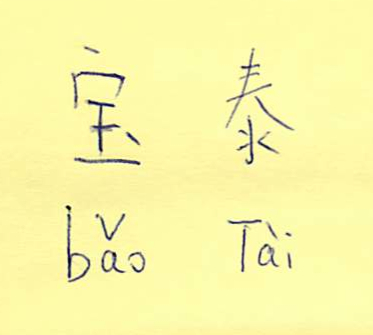
Anyway, since almost all Chinese students have a self-chosen English name in order to make life easy for foreigners, I think it is only fair that I should have a Chinese name for the same reason. So, with a bit of help from the BI-Fudan liaison office, here it is: Băo Tài, pronounced with a very sharp T:

professor-bow-tieI have, obviously, no clue as to what it means (and I am pretty sure mispronouncing it could lead to some hilarity), but have been assured by the office that it is OK. Perhaps someone out there could translate it for me?


Car-ried away a bit

I really should not be writing this – I have numerous other demands on my time, sitting in my home office and writing outlines for a couple of new courses, doing my taxes and preparing for a class in Shanghai next week. But I just read this column by Bob Cringely and, well, last Friday I picked up this beauty:

2014-03-14 12.41.36 

Now, this is a $100,000 car and you might be asking yourself why on earth a not too well paid academic should go out and purchase something like that. The answer is complicated and very Norwegian. We needed to update the Andersen car fleet (have a 1996 Mercedes C class and a 2002 Toyota Previa, both due for an upgrade). The kids are moving out, eventually, so we no longer need the minivan, and we were thinking about an SUV or perhaps a Volvo station wagon, about 5 years old. The problem is that a car like that costs $40-50,000 in Norway, due to the 200% taxes levied on almost all cars when they arrive in the country (more, if it is sportier.)

Anyway, for electric cars, there is no tax. Moreover, if you take it as a company car (I have my own consulting company), the assessed benefit is only half of what it would be for a regular car (or even a hybrid.) Moreover, you can park for free in Oslo, drive in bus lanes, get a free E-Z-Pass (i.e., the Oslo equivalent), there are free charging stations around and there is no annual road tax. Electric energy is clean and plentiful in Norway. The upshot is that this great GT car will cost me just a little bit more per year than our 12 year old Toyota. In short, a no-brainer. The Tesla S is a very cheap car in Norway, and consequently, Norway is the second largest market in the world for it. The dealer told me they were taking delivery of almost one thousand of them only in March.

It drives wonderfully, as Cringely says. After having driven it for a few days I have a permanent grin on my face. The effect is similar to driving my veteran Mercedes 6.9 – smooth and effortless power and comfort – but without the $2/mile fuel cost. In fact, driving the Tesla 100 km (60 miles) costs around $2.30 in electricity if I charge it at home, which is quite manageable, thank you very much. Now I make up excuses to drive somewhere, and constantly have to watch the speedometer, since there is no motor noise to help you estimate the speed.

iPhone Screenshot 1Right now, of course, I am not driving the car, since I am slaving away at my keyboard. But there is an app that allows me to see where it is – and currently my wife and youngest daughter have driven it to Sweden to do some shopping. With the app, I can see where the car is, how much juice it is consuming, and its speed. Great for constructing annoying messages to my wife commenting on her driving…
There has been an interesting debate in the Norwegian media the last few months about the subsidies for electric cars. The first electric cars were really not very practical – range and speed limited to 50 miles and 50 mph, respectively – and so the tax incentives where set up. Then the Tesla comes along with technology blowing everything else out of the water, and now you can be environmental and have fun at the same time. This constitutes an almost existential crisis for a number of people, who write angry articles about these monster cars that, well, don’t pollute (at least not in the use phase) and, well, should not be that good. We are, apparently, meant to suffer for the environment in order to save it, not enjoy our cake and eat it, too. (I am, of course, a technology researcher and can make the excuse that I should be familiar with new technology – in fact, perhaps I should charge the thing to my research budget…)

But I am not suffering at all at the moment. Instead, I am looking forward to tomorrow when my wife, perhaps, will not need the car and I’ll get to drive it.

If you need a Toyota and a Mercedes or two, just send me an email….

New workstation setup

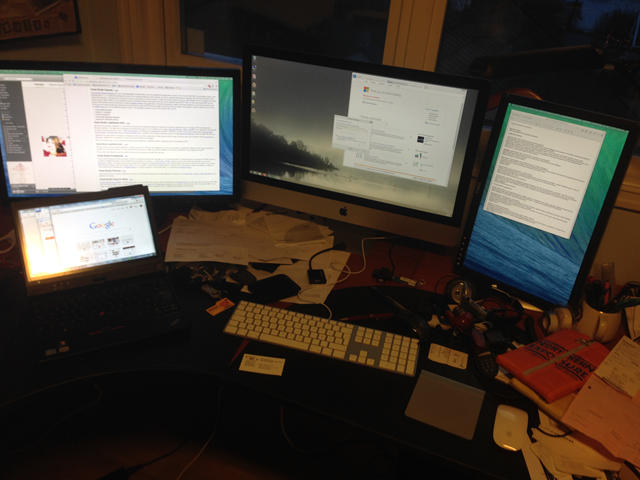
This is quite bit on the “not really interesting to anyone else” side, but, anyway, I have gone off and spent quite a bit of my research budget on new hardware, specifically a new workstation for myself. As of a few days ago, I am the proud owner (well, user) of a fully spec’ed out iMac, rendering my home working space thusly:

image

(I first thought about getting the new Mac Pro, but after reading this article and taking a more realistic look at my own needs I decided for the iMac.)

I have also installed Parallels, because a) I like Microsoft Live Writer, Komposer and a few other tools that are only available in Windows, because my employer demands Windows (yes, I am working on changing that) and because the Office package works better in a Windows environment, as I found out recently when trying to use Office for Mac and PC interchangeably in a mail merge setting and ending up doing everything twice. Parallels seems to work fine, with the exception of some keyboard issues (necessitating fiddling with configuration files and various three-finger keyboard combinations) and a not very intuitive screen management system. Oh well.

The build quality and performance of the iMac is quite something to behold – wonderfully crisp screen, makes my two older screens look quite shabby in comparison. Every other connection (network, Scansnap, Brother wireless printer Just Works, which is the way it is supposed to be. The Mac keyboard is nice to the touch, but the key combinations are a bit tricky, and reprogramming them to be more compatible across the two different environments will be, I suspect, quite a bit of fiddling in the years to come.

Anyway, I am now fully Mac’ed up, but with Windows compatibility, in a nod to the environment I primarily have worked in the last 20 years or so. The hardware quality of the Mac is extremely high, as is the design factor, but the software still leaves some to be desired – the differences are not great, but they are there, and I want the flexibility. One of my colleagues actually has a late model iMac and uses it almost exclusively as a Windows machine (he boots into Windows with Bootcamp). I would like to explore the native Mac apps (Pages, Numbers and Keynote, especially Keynote) but given that I write and develop things collaboratively I cannot base myself on them entirely.

My main reason for getting the iMac, however, is that I want to start fiddling a bit with video editing. I did an interview on the future of technology and computing in the next 5 years (in Norwegian), and asked to get the raw material for my own purposes – time to see to what extent I can use the technology to be in more than one place at once, flip the classroom, fiddle with a MOOC (or, well, more like a SPOC), or perhaps just animate some presentations. There certainly should be enough horsepower for the foreseeable future…and a rather cool home office. All I need now is an Aeron chair (ordered), a desk with a glass top with someone to polish it, a cleaner for all the dust and junk, a black turtleneck sweater, a head shaver and a personal trainer, and I should be well on my way to digital guru status.

Oh well, if it only was that easy…

NeXT and the voice from the future.

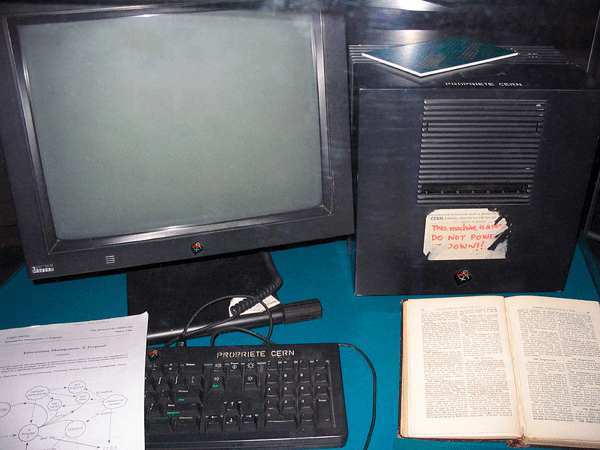
The NeXT at CERN that started the WWW

I am currently watching a rerun of a BBC documentary about Apple and Steve Jobs, which made me think of the first (and only) NeXT machine I ever had. (The NeXT was what Steve Jobs did after he was fired from Apple – and the picture here is the NeXT machine at CERN that Tim Berners-Lee wrote the first web browser on.)

Anyway, the year was 1990, I was a doctoral student in my first year at Harvard Business School, and had a large office to myself (I was sharing it with other doctoral students, but for some reason they were seldom in.) One of the MBA students worked for NeXT and got us a loaner machine, and, well, it was just standing there.

At a time when computers either went “beep” with text-based displays (that would be the 386-based Intel computers) or made a lot of noises with graphic but rather crude displays (that would, mainly, be the Mac II), the NeXT stood out – a black cube made of magnesium, a connected laser printer (most of the processing was done on the computer), and an excellent screen using Display PostScript, which meant that there was no difference between what you saw on the screen and what came out on paper – it was, quite literally, the same technology.

I dicked about with that machine far more than I should have done, given my course load, but on the other hand I wrote some papers on the importance of object orientation for complex business applications – as well as a few Smalltalk programs. The NeXT cube really was not that useful – not because it wasn’t good (it was excellent) but because it was very much a network machine – and I had no network to connect it to. Neither could I get hold of the CDs necessary to store the information from the computer. I could print, but that was about it – so the machine became a highly desirable but not really useful toy.

But it managed to give me a scare, once. It had a digital signals processor – a DSP – and a good speaker system, at a time when most computers could not play video and had tinny little speakers that mostly beeped. I was sitting in the office reading something, and the NeXT machine was on, but I wasn’t using it.

Suddenly I heard a very attractive woman’s voice saying with a certain British crispness: “The printer is out of paper.” I was startled and literally looked around in the room to see if anyone was there. It took me a while to understand that it was the computer speaking – and then, of course, I couldn’t reproduce the sentence.

I still remember that confused feeling. Now most of our music and half the dialogue we hear come out of computers, but back then it was, literally, a voice from the future. And it was just a little bit scary.

Newsblur–an alternative to Google Reader

The best way to find new tools and work tips is to see what other people are doing – which is why I spend time writing up experiences with various tools. It is even better when you can read the experiences and work tips of someone you admire – such as this Lifehacker interview with the frighteningly articulate and productive Cory Doctorow.

From this interview I noted that Cory, like many of us, has to leave Google Reader – as he says, probably for Newsblur. I promptly went there, plonked down $20 for a year’s subscription, choose “import Google Reader subscriptions”, and wondered why I hadn’t heard of this gem before. In addition to RSS feeds, Doubt if I will ever open Google Reader again…. Newsblur seems more elegant, gives me the option of reading the blog in original format, and has a great interface for adding and deleting blogs. And it is trainable – i.e., it observes what you read and asks your opinion – though I haven’t used it long enough to see how this works.

Highly recommended – and the fact that a) this is fee-supported, hence not subject to arbitrary facing-out decisions that leave a loyal following with no tools, and b) recommended by Cory and now – gasp – me, should make this a very viable tool in the future. The creator, Samuel Clay, is a bit overwhelmed with demand right now (hence no free test subscriptions), but that will change as the site firms up its infrastructure and gets more optimized, I am sure.

Highly recommended!

Collaborative online writing–some personal experience notes

I am currently spending a lot of my time in a collaborative writing project with my friend and colleague Bill Schiano – the details are not important at this point, but it is a book-length, somewhat complicated piece of text, and involves an editor. Bill is in Boston and I am in Oslo, usually a six-hour time difference. A relatively short deadline has necessitated finding a way to work together which is faster than the time-honored method of e-mailing drafts back and forth. Shouldn’t be hard in this day and age, with cloud-based software and 60-megabit Internet connections, right?
Well, it is. We started out with Google Docs, which is great for quickly setting up shared documents fast and handles multiple concurrent editors (you can actually see the other person writing almost in real time.) However, it turns out it lacks some of the nicer interface details of good old Word, such as comments in bubbles and a lot of the keyboard shortcuts. It also quickly gets very unwieldy as the document gets longer.

We then tried out Scrivener, an authoring (as opposed to word processing) tool which recently has become available for Windows and is touted as the best thing since sliced bread by a number of authors. We found it to be fantastic for authoring – if you are a single author. For two or more people working together (over a DropBox-shared directory) it lacks the version tracking and commenting features, meaning that we would have to be very disciplined about who wrote what where and have lots of supporting documents a la “Unifinished issues”. After a few screw-ups, we decided to try something else.

We then came up a with solution that really works, which we have been using for a few months now and gives us nearly everything we want: The venerable and much-maligned Microsoft Word. The difference is that the document we work with (which currently stands at 157 pages, nearly 63000 words, just over a megabyte storage) is stored on Microsoft OneDrive, and we can both edit it using Word on our computers. I will leave the actual setup of this as an exercise for the reader, but the short version is that you set up a OneDrive account at onedrive.live.com, open a new document in Word (must be at least the 2010 version) and save it to OneDrive. You then share by sending a link to your co-author, who opens the link and can then choose to edit it online (i.e., through a browser) or in Word on his or her own machine.

This gives us the best of both worlds. We can edit the document on our own machines, see the changes the other has made and accept them, write comments in the text that the other person can respond to. We do Skype meetings (with Skype Premium, so we can share screens) about twice per week to discuss things we cannot fix simply by shared editing, and the whole thing is progressing quite nicely.

As usual when you start using an old tool for something new, you learn a few tricks you hadn’t thought about – the best way to learn new tricks is always to watch someone else using the software: I learned that you can control-click on an item in the TOC to go directly to it by seeing Bill do it, and he learned that you can grab selected text pieces and drag them to new places (without doing Ctrl-x Ctrl-v.) That’s why I think every group working together should have an occasional “Tips and tricks swap meet.”

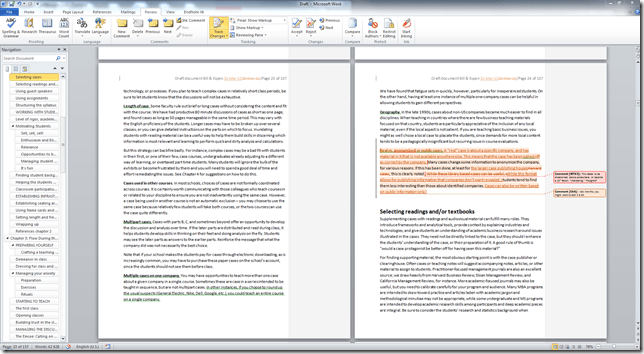
We have found that working with a large (at least 27”) screen as your primary tool is immensely useful. That allows a full-page view with two full pages and a navigation pane, like this:

image

If you are disciplined about heading styles (i.e., chapter headings being “Heading 1” etc.,) then the navigation pane works more or less like the outline or slide sorter in PowerPoint, allowing you to drag and drop chapters and sub-chapters around and promote or demote them, which is extremely useful when your work approach is to bung in a lot of text in sub-chapters and then sort out the structure later. (Word is a bit irritating in its use of styles, though – it should be easier to enforce a standard style set, unchanged when text is clipped in from other sources.)

Another useful trick is to go to the File>Recent screen, locate the shared draft, and press the little push-pin to the left of it. This places the document permanently at the top of your Recent files list – making it very easy to open without having to go to OneDrive etc. (Note 2014-01-9: This seems to only work on the Windows version of Office, not on the Mac. Another reason to get Parallels.)

When working together like this, you also need to come up with a shared notation for work – how to you mark some text as tentative, for instance. The standard comment and track changes settings are OK (but change the standard for Track Changes so it does not track changes in formatting) but you need more than that. We have defaulted to marking spurious text with {curly brackets} and reference points with “zzzz”. (I have heard other writers, such as Cory Doctorow, use “tk” because that particular letter combination does not appear often in the English language, unless you write about the Atkins diet.) The idea is that even with a large document, you can search through it until you have fixed all issues, i.e., gotten rid of all the curlies and zzzz’s.

There are, of course, a few issues you need to deal with. That a document is shared does not mean it is backed up, so we both do local, dated backups every now and then, just to stay on the safe side. The more users are editing the document, the slower it updates, so we try to be disciplined about a) saving often, and b) exiting the document when we are not editing it. If not (as Bill found when Espen had done a lot of small edits and then, in Norway, gone off to bed while leaving the unsaved document on his workstation,) the edited paragraphs become inaccessible to the other author. So, save and exit whenever you can.

And that’s it so far – just sharing experiences here, but this approach really works. Our next challenge is bringing our editor on board – so far we have been sending him chapters as they have become ready. I am now going to set this up for collaboratively writing with a couple of other colleagues, on shorter pieces, and we’ll see how that goes.

Keep you posted – and tips and tricks are appreciated!

Update 2014/4/30: SkyDrive has become OneDrive, so I have adjusted for that.
UPdate 2016/7/18: You can now open a document in Word using Google Chrome.

A day in the life of a Computer Expert

(Julie linked to this article, which made me remember that I actually wrote something similar in 1989 or thereabouts, when I was running user support for the Norwegian Business School)

Report from the trenches: Scenes from the life of a computer expert

The onslaught of user-friendly personal computers, where the user points and clicks his or her way to computational satisfaction, is hailed by many as the beginning to the end of the in-house computer expert (also known as the Local Guru). As this field report will show, there is no reason to look at the classifieds yet. Relax, guys.

The dominant source of computer problems is finger trouble. Finger trouble is the term computer experts (loosely defined as anyone who knows the approximate location of the power switch) have coined for problems inexperienced users get themselves into by way of the keyboard. While this source of job security and discretionary income may be reduced due to graphical user interfaces, there are still plenty of hardware errors to keep us occupied. Hardware errors are part of the everyday life of all computer experts, and show no sign of abating.

Let us examine a typical case, in order to gain an appreciation of the current state of things: The setting is a medium-sized company with high ambitions, a ubiquity of PCs and a Computer Expert (hereafter called E.). E. is sitting in his office, consumed with the difficulty of reaching level 42 in the 486 version of the “The Hitch-Hikers Guide to the Galaxy” when the telephone rings. Having recently cleared his office, E. manages to find the telephone before the caller gives up. The voice in the other end informs him, with audible consternation, how that darned printer, again, won’t do what it’s supposed to. Can E., with his long-standing reputation as a technical wizard, do something about it? The Voice (hereafter dubbed V.) assures E. that the matter isn’t pressing – but if he has the time…. (Somehow V. manages to convey a message of great need, sort of “you just take your time, we don’t mind sitting here rolling our thumbs and wasting the company’s money etc.”). E., when airing a suspicion that the equipment in question probably isn’t switched on, is informed by V. (with audible consternation) that they have in fact been using computers for several years now etc.

The setting 10 minutes later: E. arrives in the manner and style of a 20th century doctor making a house call on a farm far away from civilization (or like a veterinarian in Yorkshire). From every nook and cranny the office personnel come running to witness an Expert’s modus operandi (please bear with me if I’m carried away a bit here). E. eyes the printer and sees that the cable between it and the PC is present – and that the switch, indeed, is turned to ON. Still, the thing is as dead as a post- Format C: hard disk.

With a supreme air of confidence E. grasps the power cord and begins to pull. A veritable birds’ nest of cables appears (the premises were constructed long before information technology made its cheerful appearance in organizational life). Dangling inside the cable web is a power plug, its prongs conspicuously devoid of physical contact with anything electric. E., with an air of quiet achievement, lifts it high in the air for examination in a gesture reminiscent of a surgeon in a 1950’s war movie (the scene where the bullet has just been removed from the young soldier’s chest).

The reaction of V. and colleagues at this point depends on a number of variables, chief among them their rank in the organizational hierarchy. The range of reactions varies from “how could I be so stupid (again)” to “who the hell loosened that plug”. Suddenly the preferred topic of conversation is anything but office automation – frantic discussion of the quality of the local cafeteria coffee ensues, accompanied with a noticeable rise in body temperature above the 6th vertebrae.

E.’s reaction depends mainly on the tone of the initial telephone conversation, the distance covered in order to reach the culprit, and what he could have done instead. (The number of times this has happened before might also have some effect, but as V. normally has a choice between several E.s it is not likely that the scene will repeat itself with the same E. very often.).

If E. is a really experienced technical wizard, he will refrain from sarcastic comments, quietly lay down the power plug, and disappear into the sunset. The lonely hero has done it again. He has for the nth time shown who is the boss – who is in command of this omnipresent technology, incomprehensible to mere mortals.

But he knows this cannot last. There will come a day when the users will check for loose power plugs – a day when no carefully choreographed searches beneath desks will be enough to sustain his reputation as a technological superhero.

That will be the day he will have to learn how to change printer paper.

Testing blogging from iPhone 5

This post is written using my little Think Outside keyboard and my iPhone 5, via the WordPress app. The app is not very good (it lacks the immediacy of Windows LIve Writer, as well as the WYSIWYG interface). I wanted to buy the BlogPress app, which apparently offers a better experience, including better picture and video integration, but apparently Apple thinks I am in the US and will not let me enter a Norwegian credit card. Just when you thought the world was going global…then it is not (and yes, I have a slight keyboard issue here as well, working on it.)

Anyway, seems this works. Barely. If only there was a blogging extension to Evernote….

Think outside the iPhone

I recently got myself an iPhone 5 – despite researching technology, I am rather slow in adopting it. One advantage of never throwing old technology away, however, is that accessories sometimes work – and I just discovered that my old Think Outside bluetooth keyboard works, originally intended for my Palm Pilot V, may it rest in peace, work rather nicely with the iPhone. (Here’s how to do it, in case you’ve got one lying around.)

Meaning that, once again, I can go to meeting carrying stuff only in my suit pockets and still be able to take notes using all ten fingers. Now, all Apple needs to do is to lengthen the battery time on the iPhone to match the Palm Pilot, and we will have gotten past the “Concorde moment”* that was the Palm Pilot…

*A situation where technology regresses – the Palm V had lots of functionality that has since disappeared, like week-long battery time and the Graffiti sign-recognition software. First uttered by James May on Top Gear.

The complicated path from innovation to acceptance

One of my favorite essays is Elting Morison’s Gunfire at Sea: A Case Study of Innovation, from his book Men, Machines and Modern Times (1950, MIT Press, PDF here). In it, he details the story of Captain Percy, US Navy, who by making changes to the sights and elevation mechanisms of the cannons on his ship increased the accuracy by about 3000%, which should be considered relevant. Subsequently, his innovation took a long time to be accepted throughout the Navy, for reasons having to do with the innovator himself (he was a rather controversial figure), the rate of innovation (simply too good to be believed) and the fact that the innovation went against certain organizational and cultural norms (no news there, I am afraid.) One of his conclusions is that no military service should be allowed to reform itself, a point I think we can extend far beyond the military.

But this well told and well documented story is not the only reason this essay is one I keep coming back to. I also like (and frequently retell) the introductory story, which goes like this:

In the early days of the last war [i.e., WWI] when armaments of all kinds were in short supply, the British, I am told, made use of a venerable field piece that had come down to them from previous generations.  The honorable past of this light artillery stretched back, in fact, to the Boer War.  In the days of uncertainty after the fall of France, these guns, hitched to trucks, served as useful mobile units in the coast defense.  But it was felt that the rapidity of fire could be increased.  A time-motion expert was, therefore, called in to suggest ways to simplify the firing procedures.  He watched one of the gun crews of five men at practice in the field for some time.  Puzzled by certain aspects of the procedures, he took some slow-motion pictures of the soldiers performing the loading, aiming, and firing routines.

When he ran these pictures over once or twice, he noticed something that appeared odd to him.  A moment before the firing, two members of the gun crew ceased all activity and came to attention for a three-second interval extending throughout the discharge of the gun.  He summoned an old colonel of artillery, showed him the pictures and pointed out his strange behavior.  What, he asked the colonel, did it mean.  The colonel, too, was puzzled.  He asked to see the pictures again.  “Ah,” he said when the performance was over, “I have it.  They are holding the horses.”

And there you have it – people just don’t want change (unless it is more of the same). Let me illustrate this with the following story, from back in the 80s when I ran user support for the Norwegian Business School:

One user came running up to the IT department’s help desk informing us that “the printer has gone”. The printer in question was an IBM mainframe printer, roughly the size of a large freezer, and was situated, all by itself, in a small (about 2 x 3 meters) dedicated room, like this:

image

The help desk person consulted his terminal, which after a few keystrokes reported the printer as present and ready. Still, the user maintained that the printer was no longer there. An investigation was launched, and a small investigation party, consisting of the user and two or three incongruous IT people set out for the printer room. After a few minutes, the IT people returned, reporting that a) IBM’s service personnel had been there and serviced the printer, and b) for reasons unknown, they had changed its position thusly (and note, the printer and a few cases of paper were the only things in this room):

image

This episode proved to me that Morison definitely was right – most people cannot handle change, and get rather upset when things are in any way out of the normal.

Furthermore, most people do not think about why the world is the way it is, but that is the subject of another essay.

May the change be with you – mostly, it is good…

XKCD’s brilliant table of approximations

This says it all:

Source: XKCD via Boingboing.

Seriously cool robot

These two robots, developed by Boston Dynamics, are Youtooobing:

I can imagine this one (called the Sand Flea) being used by the military and police for sending in cameras and other spy equipment in an urban landscape. The Big Dog (below) is something I really could use when I am gardening – a container on its back, and a voice interface so I could tell it to go empty itself in the compost bin when it is full of garden refuse.

The dangerously bloodless war

War is not what it used to be. Both the implicit trends and explicit strategy has gone from large-army movements – the invasion of Iraq may be the last large-scale invasion we will see for quite a while – to smaller-unit conflict management and “surgical” actions, such as the raid on Osama bin Laden. This is partially a result of technological evolution (advanced weapons demand much training, making conscripted soldiers, who become civilians just as they have learned how to operate them), partially a change in warfare – more and more conflicts are asymmetric, with urban or rural guerillas facing a traditional military force, hiding among the civilians and forcing the regular army to either be ruthless or to win hearts and minds.

In both cases, war is expensive for the decision-makers. Today’s young men do not have four brothers and face a career of back-breaking work on the family farm or in a factory or mine – prospects that might make a military career, however the peril, look interesting. With less than two children per woman being the average in European countries, parents (and to a certain extent society, through education) have way to much invested in each individual to squander them on unnecessary and unimportant actions.

This might change: New weapons such as remote-controlled and even automatic drones with pilots sitting halfway around the world, out of harms way, means that the price for war (both in money and lives, of soldiers as well as innocent bystanders) has been significantly reduced. So far, this form of remote warfare has been an American forte, but the weapons are becoming available for smaller countries, first in NATO, then in other countries. I predict that Norway, for one, will scale back its very expensive and politically complicated purchase of advanced, manned F-35 fighters and instead see if more of their needs can be met with the cheaper drones – a disruptive innovation in more than one sense.

This evolution is slightly worrying, for a number of reasons: First, the lower cost of war may make military solutions more tempting to politicians – bloodless or not. Second (and in the longer term more scary) automated weapons can, like all automatic systems, malfunction in unpredictable ways and you can even envision them turning against you, as has happened with anti-aircraft missiles. You really don’t want rogue drones with malicious intent out there, whether it is inserted by hackers or come about through unintended systems interactions. Third, the low price and standard components of the weapon systems may mean that they, in time, will be available not just to large nations, but also to the guerillas and terrorists they were invented to confront. Imagine a home-made drone with cheap technology as the new Kalashnikov – solid, simple and able to make up in numbers what it lacks in sophistication.

I don’t know if remote weapons need a solid infrastructure of communications technology, in particular networks (satellites, cellphone networks, wi-fi) or if they can be controlled with direct radio transmission. There is quite a lot of data that needs to go across, in close to real time – but given the falling cost and increasing range of of digital wireless communication, it is not too hard to imagine that these weapons could be cheap, perhaps even built from standard parts by insurgents themselves, both for spying and for weapons delivery.

Small and cheap has a tendency to carry the day, and enemies learn from each other. Let’s just hope that Steven Pinker is right – and avoid thinking too much on the suppressive possibilities of autonomous weapon systems.

Original and cover–complementary, not competitive

This is the original version of Gotye’s Somebody That I Used to Know:

The video is elegant, sexy and interesting. How to improve it? Well, here is a cover version by a homegrown little band called Walk off the Earth:

I actually like this version of the song better – even without the video. But they are both great. And there you have it – the beauty of art, evolving where people take what others have done and put their own spin on it. Brilliant.

Incidentally, the reason I found these videos is entirely due to my youngest daughter. Just so you don’t think I have the first idea about music. Or anything else.

Computing’s cathedral history

Turing's Cathedral: The Origins of the Digital UniverseTuring’s Cathedral: The Origins of the Digital Universe by George Dyson
My rating: 5 of 5 stars

This is a tour de force history of the birth of the modern computer – and, specifically, the role of Princeton’s Institute of Advanced Study in it. Their “IAS machine” was a widely copied design, forming the basis for many research computers and IBM’s early 701 model.We hear of John von Neumann (who tragically died of cancer at 53), Alan Turing (stripped of his security clearing and probably driven to suicide at 41), Stan Ulam, and many others, some famous, some (quite undeservedly) less so. I continue to be amazed at how far ahead some of the thinkers were – Alan Turing discussed multiprocessor and evolutionary approaches to artificial intelligence in 1946, for example.

On a side note, I was pleased to see that a number of Norwegian academics, mostly within meteorology, played an important part in the development and use of the IAS computer. Nils Aall Baricelli, an Italian-Norwegian, was someone I previously had not heard of, one of those thinkers who is way ahead of his time and (perhaps because he was independently wealthy and led a somewhat nomadic academic existence, hence may have been considered something of a dilettante, though Dyson certainly don’t see him as such and credits him with the ability to see a possible way from programmed computer to independently learning mechanism (and, perhaps at some point, organism).

The book is a bit uneven – partly standard history, partly relatively deep computer science discussions (some of them certainly over my head), and partly – with no warning – brilliant leaps of extrapolating visioneering into both what computers have meant for us as a species and what they might mean in the future. It also shows some of the power struggles that take place in academics, and the important role IAS played in the development of the hydrogen bomb.

All in all, an excellent history of the early days of computing – a more recent history than many are aware of. As George Dyson says in his Ted lecture (below) in 2003: “If these people hadn’t done it, someone else would have. It was an idea whose time had come.” That may be true, but it takes nothing away from the tremendous achievements of the early pioneers.

View all my reviews

Tips and tricks swap meet

Today I hosted a brown bag lunch with researchers from BI’s Technology Strategy group and MIT CISR. The objective was to get to know each other, but every meeting needs a topic, so I asked people to bring their computers and share a few smart things, useful web sites and other things they have discovered, that people wouldn’t know about.

Here is a list of some of the smart tricks and tools people came up with:

  • If you need to edit a large document in Word, create a table of contents, place it at the beginning of the document – and jump to the right chapter or subsection by control-clicking on the TOC. (Alternatively, use the document map feature, see this blog post.)
  • Pressing . (period) while in presentation mode in Powerpoint will give you a black screen, pressing the same key again gives you the slide back. Useful for making people listen to you rather than read the slide.
  • A tablet computer is useful for presentations: Draw on slides, use Windows Journal to sketch out diagrams and drawings – which you can then PDF and make available to students.
  • This article explains how to get rid of New York Times cookies with a bookmarklet.
  • Google Reader (since discontinued, use Newsblur instead) lets you read RSS feeds quickly and easily.
  • Clearly from Evernote is a great tool for reading webpages – removes unnecessary clutter and lets you save the page to Evernote.
  • Think-Cell is a great tool for creating charts in Powerpoint, faster and simpler and more good-looking than standard Excel.
  • Whenisgood.net is great for finding possible meeting times.
  • The Meeting Planner from timeanddate.com is useful.
  • If this then that lets you automate certain web tasks by monitoring information streams and taking action based on their results.
  • Hipmunk is great for finding flights quickly, has a great graphical display.
  • In Word, under the File/Open or File/Recent menu choice, there are little pushpin symbols that, if pushed, will make sure the document stays visible in the list.
    Very useful for keeping the position of frequently used documents that are stored in SharePoint without having to go through a lengthy access procedure.

The fun thing with a little meeting like this is that everyone comes away with at least one or two things they hadn’t thought about – which is more than you can say for most meetings.

A value chain at work

This old footage (via egmCartTech) of the 1936 production process at Chevrolet’s plant in Flint, Michigan, shows a value chain at work – i.e., a process where value is added in small, repeatable, sequential steps. This is how many people still see companies…

It is notable for many things – the relative imprecision of the production (dents in parts being marked for later fixes), the simple design of the cars (two-box design built on a frame, soon to be overtaken by the monocoque design already introduced with Chryslers’ 1934 Airflow), and the notion of the human as the servant of the machine, doing simple things repetitively and to be attempted replaced by robots in the 70s and 80s as production became increasingly componentized. Toyota eventually introduced the Kan-Ban principle, where each worker is responsible for the quality control of previous work and can stop the process. But no wonder GM had quality problem as designs got more complex…