Category Archives: Digital reflections

Broken by design?

Peter Gutmann, a very reputable computer scientist, has written a highly critical analysis of the content protection features of Microsoft Vista, which is currently being discussed on Slashdot (1, 2) and essentially every other place in the known blogosphere. It seems like Microsoft is trying to close the "analog hole" by using market fiat to require all hardware vendors to downgrade performance unless all devices are certified as DRM-capable. Here’s the executive summary:

Windows Vista includes an extensive reworking of core OS elements in order to provide content protection for so-called "premium content", typically HD data from Blu-Ray and HD-DVD sources. Providing this protection incurs considerable costs in terms of system performance, system stability, technical support overhead, and hardware and software cost. These issues affect not only users of Vista but the entire PC industry, since the effects of the protection measures extend to cover all hardware and software that will ever come into contact with Vista, even if it’s not used directly with Vista (for example hardware in a Macintosh computer or on a Linux server). This document analyses the cost involved in Vista’s content protection, and the collateral damage that this incurs throughout the computer industry.

[…] The Vista Content Protection specification could very well constitute the longest suicide note in history.

I’ll withhold judgement until I hear from people who know hardware design better than me, but this sounds like a major stumbling block for Vista adoption. The underlying market dynamics in the computer market, as Nick Carr recently said it, is that "hardware wants to be software, and software wants to be free." The Vista content protection specs seem to want to reverse that. I don’t think it will work, long-term: As Gutmann points out, cheap and single-use hardware devices can be created that circumvent premium content protection quite easily.

And to think that I just went out and bought a Media Center PC. Arrgh. I have been thinking about buying a Macintosh as my next laptop, this just about clinches the decision. 

(Via Hugh McLeod)

Update Dec 31st: This is turning out to be an interesting discussion, see Joho and Bob Cringely for viewpoints. What a pity Scoble has left Microsoft.

Update Jan. 14, 2007: There is a good interview with Peter Gutmann at Tvit.tv. Amongst other things, he says he got the phrase "longest suicide note in history" from a bad political program – and that you could not listen to the podcast of the interview without having parts of your PC either shut down or intentionally lose performance. The interviewer describes Vista, with it’s 30-times-per-second system authentication check as "insanely paranoid".

Somehow I don’t think this will fly, and not just because hackers will fix it. It has never been good strategy to go to war against your customers. 

Extatosoma tiaratum

Seth Godin found an insect for which there was no entry in Wikipedia, and made a prediction about how long it would take before it was fixed.

There. The rest we can leave to the expanders.

[insert obligatory Yochai Benkler social production comment about here]

Freeconomics for Freakonomists

Chris Anderson goes all soft and mushy over the fact that we now seem to be breaking the "penny per MIPS" barrier.  He is right to step back and shake his head in wonder: Moore’s Law is still going strong, thank you very much, and it is sometimes (OK, once per year would be about right) useful to step back and reflect a bit on what this means.

I started saying in various speeches back in 1995 or so that computing, communications and storage should be considered free. That doesn’t mean that you won’t continue to pay Intel or your telco or various harddisk producers a lot of money, but it does mean that if you want to do something strategic, lack of computing power is not going to hold you back. I think I was right then, and I think I am right now: It is not the technology that slows us down, it is our imagination. Or lack of it.

In a market with falling resource costs, it is sound practice to think of resources as free – it frees up your mind as well. One of the reasons Google is possible, for instance, is because they use cheap hardware and an open-source base, on which they build their infrastructure. If they need another 40000 servers, that does not mean they need to pay another 40000 licenses – a saving not just in license fees but also in the inevitable monitoring and accounting that goes with any kind of pay-as-you-go scheme.

Now if we could only free up the information of the world to the same degree. I wonder when the European countries will reach the same realization that the US seems to have reached a long time ago: That the value of making all public information freely available (in tax from companies profiting from it, for instance) vastly exceeds whatever license fees can be had from selling information already paid for by your tax money back to the people who provided it in the first place. I predict that public information will be public, partly because what Yochai Benkler calls "social production" can recreate it (the way UK internet users are recreating the proprietary postal code database), partly because in a connected society, having free access to public data becomes both an individual right and an effective check on government – and voters will start demanding it.

But it will take time and it will not proceed according to Moore’s law. But perhaps we can use Moore’s law to free the information – by using search engines to sniff out and systematize the information that should be ours in the first place?

That would be a hacking project in the Wikipedia spirit. Free the captured information!

Owning words

Steven Berlin Johnson has an interesting little piece in the NYT Review of Books, where he discusses how words acquire meaning – or, rather how online definitions of words acquire meaning over time, thanks to the perpetual ephemerality of online material. Definitions by Googlerank. Recommended.

PS: The NYT has come up with an alternative view ("Single Page") for those of us who like to see the whole article at once. Previously, you could use the "Print" version, but that would strip out pictures and diagrams and make the page less readable on screen. Smart.

PSPS: If I were to follow SBJ’s viewpoints here, I should probably have written the first PS as a separate blog entry, titled "Single Page". Oh well. Guess someone else will have to carry the burden of defining it…

Firefox 2.0

Firefox logoFirefox 2.0 has been released and has more than 2 million downloads in 24 hours. Including mine.

The main updates seem to be in more RSS functionality, a tastefully updated UI (including better tabbed browsing), and the ability to restore work sessions. The latter feature is one I will appreciate – when you work researching something and your computer freezes, being able to bring up all the tabs again is reassuring. (Haven’t tested this yet, luckily, but I am sure I will in the not-to-distant future.)

Firefox can sometimes be a memory hog – hopefulle this has been fixed in the new version. 

Seamless install and transition from earlier version, as usual with Mozilla applications. Highly recommended.

Update: Slashdotters (some, at least) think 2.0 inferior to 1.5. So far, I disagree.

Forking Wikipedia?

Nick Carr sees no reconciliation between "deletionists" and "inclusionists" over how Wikipedia should continue to evolve.

Wikipedia was originally started to generate content for a more traditional encyclopædia, called Nupedia. It seems like it worked according to plan. Perhaps it is time to generate Nupedia.

For my part, I remain a "delusionist" a little longer, betting on people’s ability to vet out incomprehensive or incorrect information. It seems to me that people deal with information differently when they are in search mode – and that what Wikipedia needs is some sort of disclaimer to alert people that, though it may have a very high Googlerank, anyone can write and the vetting process taking place is the one done by those who read it before you. Given simple and powerful search, however, the process of validation should be quick and simple. I can live with that.

Google’s functional expansion

Chris Anderson reports and Anil Dash analyzes Google’s gradual move towards providing more functionality on top of data elements.

This is a very significant move, and starts with the information. First Google lets you find information, in the process becoming the standard interface to the net and the first port for information in general. Then functionality is added to the information – not as advanced as what you can get on the desktop, but good enough for  a start.

The important issue here is that this is a potentially disruptive innovation because it allows people who formerly were not able to change/process/analyze information to do so – but with technology that will be deemed inferior by those that are the best customers of the existing software vendors. As Anil says, the 500 most important customers of Microsoft wants less change and other kinds of functionality than the infinitely larger market of individuals with smaller investment budgets.

Cory Doctorow video on Google video

Google Video has its uses – here is the video from the speech Cory Doctorow gave in Oslo in May 2005. Don’t know who put it there, but it is public domain – and yes, it is yours truly giving the overlong introduction.

Jurassic Blackboard

Blackboard (or, as I like to refer to it, Blackbored) is a learning management system used by many schools and universities, including mine.  I will have to admit to being somewhat involved in the selection process, by advocating that since there really was no difference between these products 6 years ago (still not much of a difference, really) we might as well go with the market leader, for reasons of externalities and experience.

Blackboard is not a good product. It reminds me of certain software packages I used on an IBM mainframe under VM/CMS back in the 80s – packages like PROFS, which were good then but are obsolete now. Blackboard has a few good attributes, first and foremost that it can be used by the truly clueless, both teachers and students. And it does have a nice sub-system called SafeAssignment, which does a good job with plagiarism detection.

Over the summer, the IT department here installed the newest version of Blackboard – version 7. As far as I can see, there are very limited additions in functionality, mainly associated with keeping score of students’ grades (which I do in an Excel spreadsheet, much faster and more flexible than Blackboard’s web interface). I am now working on re-establishing my courses after a six month sabbatical. That is a chore at the best of times, and Blackboard makes it worse with its tedious interface and limiting structure.

Here is a running list of irritations, as I notice them:

  1. When you upload a file, you can only upload one at a time (no control-click to select more than one.) Yes, you can zip the files and upload the zip archive, but that is a kluge. Why on earth can’t I click on several files at once – every web service under the sun can do that, starting with services that lets you upload pictures?
  2. It doesn’t work well in Mozilla Firefox. It has gotten better: Version 6 had several things that only worked in Internet Explorer. No problem, Firefox has a small market share – except on campuses, where it sometimes dominates. What kind of companies use Blackbored? That’s right, universities. Smart.
  3. It is not possible to publish a course, or parts of a course such as individual pages, to the web. Those of us who like to share our courses with the world will have to maintain separate web sites.
  4. You cannot pull external web pages into Blackboard, only link to them.
  5. Possibilities for customization are very limited – you can change the color of buttons and such, but you cannot, for instance, rearrange the order of courses that appear on your login screen, or where they go.
  6. The menu system requires an incessant stream of clicking – start at a top screen, click down in the hierarchy, click to do something, fill in a form, press Submit, wait forever, get a "success" screen that you have to click to close, and then get taken back to the screen you started with. If you have a lot to do, especially repetitive tasks, this drives you nuts.
  7. There is no ability to apply changes to more than one course. As a matter of fact, there are no shortcuts whatsoever for people who are comfortable working with information technology.
  8. There is excessive duplication of information. I am listed in 5 courses, and for each one of them I have to go in and fill out "staff information" about myself. To put it in technical terms, their database is not in normal form. If you have a number of courses that use (wholly or partially) the same material, this drives you nuts. Especially if you find an error and have to correct it 5 places.
  9. You cannot customize announcement displays – so I end up getting my login screen cluttered with stale announcements from courses I have guest lectured in a long time ago.
  10. The system is a nightmare to manage for the IT department. Trust me. Those guys usually don’t complain much, but they are swearing over the complications of adding new users to a course, for instance.
  11. There is no possibility to use social software tools, such as RSS feeds (meaning students could subscribe to changes), wikis (collaborative content creation), blogging functionality such as Trackbacks, or tags. (And don’t tell me about "next release" – this should have been in there a long time ago.)
  12. There is no click-and-drag functionality anywhere.
  13. There is no functionality for having a local copy and uploading (replicating), so that you could work in a non-connected setting.
  14. It doesn’t preserve session state, so when you press Refresh, it takes you out of the screen you were working in (the Control Panel, say) and back to the starting screen for the course.
  15. The courses (individual pages or courses in themselves)  are not searchable (or, to use Peter Morville’s term, not findable.)
  16. Each screen contains very little information, mainly because the fonts are big, so it is hard to get an overview. You end up clicking around a lot  just to find things. A more compressed view, perhaps with browser functionality that would let you jump between branches in an information hierarchy would be appreciated.
  17. You can’t log in automatically – in fact, you have to go via an opening screen with a "Log In" button. How about having the browser remembering the password and UID and jumping straight in?
  18. (added 8/31): The system makes it extremely tedious to change small errors in several entries. Item: I had, for one course, entered 10 assignments, all with text, due date etc. Then it dawned on me that I had forgotten to specify that they should be SafeAssignments, i.e., that they should be subject to plagiarism control. There was no way I could fix that, neither for the whole group of assignments nor for each entry. Instead, I had to create 10 new assignments, copy the text over, and set the "display until" dates again. Why oh why? Doesn’t the company have anyone with even rudimentary knowledge of user interfaces?
  19. (added 9/17): When students submit a paper to SafeAssignment, they don’t get a receipt that the paper has been received (for instance through an email). Coupled with performance problems in SafeAssignment, this means quite a few students think they have submitted the paper even though they haven’t.
  20. (added 9/17): When you send out an email to all participants in a course, there is no standard way of limiting it to only students. There is also no way to CC: someone who is not inside the system – for instance an external guest speaker. Instead, you have to go back to your email inbox and forward the mail from there.

Blackboard does something for straightening out formalities and making administration easier – but not as easy as it could be. It offers a space to leave content you want limited to the course participants, and has a rudimentary collaboration system. But the system forces you into a very rigid and limiting form of teaching and communicating – essentially, it automates a traditional way of teaching rather than make use of all the wonderful things the technology can do. Rather sad, for someone who is a market leader in learning management systems.

That being said, the fact that they are suing competitors to protect a patent for the idea of bringing together online learning in one package might be an indication that I am not the only person onto something here. It would be nice if they started listening to the people that use their softw
are and give them tools that made them better. If they did, they wouldn’t have to worry so much about the competition. And I wouldn’t have to work with a system that assumes I am an idiot.

PS: A tip if you have to work with Blackboard: Get the administration to set up a fake course for you (I call mine "0 Espens resources", with the "0" ensuring that it shows up on top of my list of courses) where you stuff all your teaching material in nice little folders, with questions, articles and data. When you are setting up a course, you can then copy materials from this repository into the new course, and not have to laboriously upload everything. Works like a charm. Would be even better if it was part of the package. Would be even greater if I could do it automatically from my PC and press "synchronize"….

Googlecontext

There has been much speculation following the NYTimes report about Google’s amazing new data center, located near a large river primarily because it needs a lot of power. Why do they want all that storage and processing power?

One interesting idea from Ian Betteridge: To learn to model context. Sounds plausible to me, though I think a reasonable model of how we think has much wider applicability than merely getting the right ads in front of you at the right time.

Paul Graham on conditions for entrepreneurial success

Paul GrahamPaul Graham, one of the finest essayists to ever publish on the Internet, has two stellar examples of how to take a complex issue and present it in a clear and consistent way:

As usual, Paul does not leave out the difficult parts or avoids pointing out the faults of the current model. Both essays are reworked from a keynote he gave at Xtech.

Excellent stuff. Read it. I will assign it for classes.

(Via Dragos.)

New essay in Ubiquity

ACM UbiquityMy latest essay in ACM Ubiquity is called "The waning importance of categorization" – and deals with the impact on those who categorize when information becomes infinitely searchable. Not unlike Kevin Kelly’s latest article in New York Magazine, though I deal more with the near-term changes. The main point is that, just as mobile phones made us substitute communication for planning, digitally searchable information will make us search rather than categorize.

Perpendicular

perpendicularThe next technological breakthrough to hit the market in hard disk technology is perpendicular recording. As I understand it, this means that the magnetic field is flipped 90 degrees up from the disk surface, increasing the storage capacity per areal unit as much as ten times. This Flash video from Hitachi (which includes ceiling pointing dance steps  from Saturday Night Fever) should give a technically correct, though rather hokey explanation.
The upshot is somewhat thicker but ten times as powerful hard disks. The initial market seems to be iPods and similar devices (where the density premium is higher, I assume, but maybe also because smaller disks vibrate less just because they are smaller), but 3.5 inch disks are already announced. Today’s top-of-the-line disks have about 500GB capacity, so get ready for 5TB on your laptop within a year to three….

That is rather amazing. I like disk technology – not just because it is the perennial example of  continuously disruptive innovation, but also because every time you think it has reached its technological limit and we will finally switch to solid state memory, a new dimension opens up (this time by using an old technology previously thought too complex to be worth it.)

5TB on a laptop…. I used to say that you can never be too rich, too thin, or have too much hard disk space, but now I begin to wonder. This means simple scanning of all your digital content, including music and videos, and carrying all your information with you at all times. Which new applications will we get that will take advantage of, eventually outstrip this capacity and thus drive the technology forward?

Furthermore, were will disks go once the compression-on-a-single layer dimension is exhausted? Following what happened in computer design, I suspect we will see some architectural innovation (a la Seymour Cray creating supercomputers by creatively combining – and packing – known technology) or just techniques for increasing the number of disks attached to each device. Or perhaps increases in communications technology, especially wireless, will allow us to, once more, go back to centralized data storage.

Ahhh, the march of technology. Don’t we love it. 

(Via Engadget.)

Computer book market according to Tim O’Reilly

Tim O’Reilly has two good posts on the computer-book market (post 1, post 2) with cool displays of what goes up and what goes down – rather good indicators of what is going up and down in terms of technological temperature.

Human metadata

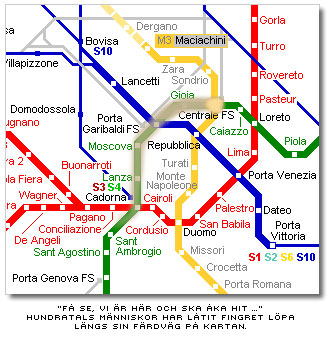
smudged mapJonas Söderström, Swedish information architect and pioneer blogger, has a brilliant illustration of the value of information about people’s information seeking behavior: In a complex information seeking situation in the subway in Milan, he finds the way from the central station to Cadorna (where Leonardo’s The Last Supper is.) He does this by observing the smudge pattern left behind by hundreds of people putting their finger on the map and tracing out the route:

 If anything illustrates the value of what Google and other search engines do, this is it: A gigantic Delphi analysis where we all know a little, and together know a lot.

There is, of course, the implied danger captured in the phrase "ten thousand lemmings can’t go wrong," but a system with feedback (i.e., repeated searches and some learning) the danger of that should be small. Most of Wikipedia’s errors eventually get corrected, and the algoritms of search engines improve daily. The fact that we all leave electronic traces may be worrying from a privacy viewpoint, but the upside is a unique opportunity of turning searching and finding into unwitting and implied teaching.

We learn as we search, but now we can teach as we search.

One world, in practice

The world
I find this entry in the CIA World Factbook fascinating: The World. Yes, there are lots of factoids that should be there – for instance, Spanish is a larger language than English, but that is for first languages only – and isn’t the world’s most important language "broken English"? Still, just the fact that an entry like this can be put together with some kind of factual underpinning is to me proof that the world is getting smaller. I also like that the very first page of the CIO World Fact Book contains an option to "Submit a Factual Update" (though the link is to a general "contact CIA" page), which is an indication that someone, somewhere, understands that mistakes are inevitable and change constant.

(Via one of the blogs on my blogroll, can’t find the entry.)

Pandora vs. Last

Steve Krause has an excellent in-depth post about the different approaches to recommendation engines for music: Pandora vs. Last. It takes understanding and imagination to refer to Pandora vs. Last as "nature vs. nurture."

(Via Dragos). 

Rasterfandung

Via the BBC comes a link to a fantastic article in the Chicago Tribune about how you can find CIA agents and installations by searching the Internet.

This is actually not a new problem – the fact that by searching for behaviors in many databases at the same time, you can uncover patterns that point to people. The term when I heard if first – in the early 80s – was Rasterfandung, which is German and means something like "sieve finding". The story was that the police in one city in Germany was looking for a terrorist, and used a number of computerized registers to focus in on people of the right age group who had recently rented an apartment, hired a car, etc. The police then charged one specific apartment and found the terrorists inside.

The problem, of course, is the perennial one of false positives – what if you are a fairly innocent person cleaning a hunting weapon when the police comes barging through the door? Anyway, the way to mitigate against this kind of searching is, as the corporate blogosphere is beginning to pick up, to flood the net with false positives. I wonder how the CIA (or anyone else) can do that?

Web 2.0 hacks

Marc Hedlund has a great little reflection on various new ways of Web Development 2.0″ href=”http://radar.oreilly.com/archives/2006/02/web_development_20.html”>digging into the nuts and bolts of Web 2.0 services over at O’Reilly Radar. I am currently mulling over search as a disruptive technology in preparation for a talk in March, with FAST CTO Bjørn Olstad. Seems to me we are increasingly moving to a situation where we all are on one (or, at most, a few) system(s), and that fact rather than what we can do as individuals is beginning to catch up to us.

Searching and finding – hard to get into

I am currently reading two books on what can only be described as Web 2.0: John Batelle’s The Search and Peter Morville’s Ambient Findability. I don’t know why (maybe just my own overdosing on reading after starting my sabbatical), but I am finding both hard to get into.

Batelle front coverThe Search is better written – it is a mix of a corporate biography and a discussion of how search capability changes society. The language is tight – though sometimes cute, as in the phrase "the database of intentions" about Google clickstreams and archived query terms – and there is a thread (roughly chronological) through the book that allows most people who have been online for a while to nod and agree on almost any page. John Batelle has an excellent blog and plenty of scars from the dot-com boom and bust (I always liked Industry Standard and wrote a column for the Norwegian version, Business Standard, for a few years, so I am very favorably disposed), and his competence as a writer shows. The book reads like a long Wired report, but better structured, marginally below average in use of buzzwords and John has the right industry connections to pull it off.

Ambient findability front coverAmbient Findability looks at search from the other side of the coin – how do you make yourself findable in a world where search, rather than categorization, is the preferred user interface? For one thing, you have to make your whole web site findable, make it accessible and meaningful from all entry points. Morville fills the book up with drawings and pictures on almost every page, comes off as a widely read person, but I am still looking for a thorough expansion of the central message – or at least some  decent and deep speculation on personal and organizational consequences. It is more a book popularizing information science than a book that wants to tell a story, and it shows.

While both books are well worth the read if you are relatively new to the Internet, I was a little disappointed in the lack of new ideas – they are clever, but once you accept that the marginal cost of processing, storage and communciations bandwidth approaches zero, the conclusions kind of give themselves. Perhaps I am tired – actually, I am – perhaps I am unfairly critical after having treated myself to The Blank Slate, The World is Flat and Collapse, but these books, while both worthwhile, have failed to "wow" me.

Apologies. I will make a more determined re-entry once I wake up.