Category Archives: CIO corner

Squirreling for SAP

Bob Cringely has a nice hand with metaphors, and his SAP/Squirrel analogy does it for me (though I have a sneaking feeling that if GuiXT really had been THAT simple, the cat would have been out of the bag a long time ago.) The truth, methinks, is that understanding what those numbers mean is just hard, no matter what, and no amount of interface fiddling is going to change that.

Anyway, time to recount (and probably repeat) my favorite SAP joke:

SAP is a new basic element, but contrary to other basic elements, which go from solid to liquid to gas as they heat up, SAP has a different cycle. It starts out as a liquid: You pour it into a hole in the business – where functionality and control is lacking – and it fits perfectly as you install it. Next, it goes into gas form, expanding until it fills the whole business as you add modules.

Then it becomes a solid, hard to change, so you have to shape new business processes around it.

(ba-da-bam.)

Signatures by fax, and security in context

(this is a work in progress, thought I would write this in public and see what reactions I get)

Bruce Schneier, the world’s leading authority on security, writes well about why we accept signatures by fax – noting that it works because it is done in context, everyone understands how insecure it is (except in the relatively rare instances when they don’t.) One thing is that we tend to think of new technologies in terms of old technologies: The physical signature can easily be faked with a fax, even easier when we start to use scanned PDFs – in fact, gluing in a copied signature becomes the standard way of doing things for most people.

I am currently thinking about security in a next-generation employee computing setup, where corporate infrastructure has retreated behind a browser and the end user can buy whatever he or she desires – be it a Mac or PC, laptop or desktop, cell phone or public terminal. Every user comes in via the public Internet, even if he or she is physically sitting right next to the server park.

From a security standpoint, this is actually a simplification, much as you simplify PC provisioning when you switch everyone to a laptop. Sure, many of the users don’t need a laptop, and a laptop is more expensive than a desktop. But differentiation has its costs, too. And it is much easier to make a desktop out of a laptop – in essence, all you need to do is sit still – than it is to to do it the other way.

If you move to an architecture with corporate infrastructure and personal, private terminals, you remove the inside-or-outside-the-moat distinction companies often naively use as their main security barrier. Instead you must verify everyone’s identity in terms of the information and functionality they can have access to. You need to specify this as a very granular level, and will need a well defined hierarchy of access rules. You will also, like Wikipedia, need to have a way to track who has done what where, and make it easy to reverse whatever changes has been done, should it prove necessary.

I am less certain that you need much of a standard for what should run on the clients themselves – surely we have progressed to a point now (or will in the near future) where end users can take responsibility for keeping their own technology’s reasonably updated and secure? We probably need to rethink security in terms of consequence management, in the sense that we need to make the consequences of poor security become apparent to the end user. The analogy is to car safety – for all the nagging about putting on your seatbelt and monitoring speeding, nothing would reduce deaths in traffic as much as a mandatory large spike sticking out of the steering wheel, instantly impaling the driver should he or she crash or suddenly brake.

(and that is as far as I got before the telephone started chiming, and it was time to scoot off for meetings and other things that eat up your day. I will be back. Comments, of course, are most welcome.)

Scarce Resources in Computing

New essay in ACM Ubiquity: Scarce Resources in Computing, about how we adapt our use and organization of information technology around what at any point is the scarce resource.

Comments welcome!

From Concours to BSG Alliance to nGenera

As can be seen from this press release, BSG Alliance (and all subsidiaries) has changed its name to nGenera Corporation. BSG Alliance acquired Concours Group last year, as well as New Paradigm and various, more technology-based companies such as Iconixx. The name nGenera represents a consolidation of the various acquired companies and signals a focus on the "next generation enterprise" – companies that use collaborative and Internet technology as an internal, native and natural arena for innovation and growth.

Consulting companies are fascinating – forever splitting and forming, driven by changes in content, business conditions and (to a rather large extent) by people chemistry. Though companies may change, the people very often remain the same – in a sense, even if you leave, you never really leave, but keep in touch (and use each other, if need be.) Modern technology underscores this sense of a cloud of people that know about each other and draw on each other when necessary, clustering around companies and ideas as need and economics dictate.

I started working in research-based consulting with Index, which was acquired by CSC, in 1994. I then moved on to work with Concours (which was formed by ex-CSC Index people plus some of their friends.) That relationship has lasted since 1999, and now it is time for nGenera, with an increased focus on collaboration technology (both in theory and practice) and an emphasis on what the future will be as well as how we will get there.

Stay tuned – a company that spans from Wikinomics to simulation technology promises exciting ideas and much to learn, while keeping a basis of solid IT management models and practices and a deep knowledge in talent acquisition and development. Stay tuned.

Ubiquity interviews Vaughan Merlyn

John Gehl of Ubiquity fame has interviewed my pal Vaughan Merlyn, a stellar IT management consultant and all-around good egg who shares some of his experiences and views. Vaughan writes a fine blog and is extremely good at navigating the rather tricky no-mans-land that still lies between business and IT. He has spent much time and effort extending and deepening some of the strategic models of IT supply and demand that we rely on in this business, in light of advances in technology and IT savvy (or, as Vaughan calls it, IT maturity) in large organizations:

When I say business IT maturity, that is a short hand way of saying business demand maturity and IT supply maturity. I think that in the majority of cases, i.e., more than a half of the situations we see – there is a reasonable degree of similarity between the business ambition and the IT ambition. For perhaps a quarter of the cases, there is a CIO who is well ahead of business. And those are the most frustrating cases. The other case is where the business is well ahead of the CIO. And that usually sorts itself out pretty quickly because sooner or later there is a change of CIO.

Here is some hard-won experience on what advisory consulting is all about:

[…] I often find that what [clients] think is the problem they are looking for help with is quite different from the actual problem they are experiencing. And very often I find some of the most important work that we do happens before the engagement begins. I think it was Jerry Weinberg, one of the great wise men of the early IT days pointed out that one of the problems with project management is when a project officially starts, it’s already been going several months. It just hasn’t yet been called a project. So there is a lot of baggage already there. I think similarly, when you sit down with a client to frame up an engagement, I find the actual act of getting clarity on what is the issue, what would the outcomes be if we successfully solved this issue, that often is enormously helpful for the client – obviously it’s important for the consultant because you can easily spin wheels trying to solve the wrong problem. But I have seen the light bulbs go on with my clients – not just little glimmers of Christmas tree lights. I mean massive flashbulbs go off as you take them through a process of issue clarification. And they realize that perhaps the problem that thought they had isn’t the real problem. So I think that is a value that a good consultant brings to the table – helping to clarify what the real issues might be.

Budding consultants, take note!

Canon LBP2900: Good personal workhorse printer

While I am on the subject of my technology setup, let me pause briefly to sing the praises of my Canon LBP 2900, a small laser printer which lives unostentatiously next to my home office desk.

It was cheap and  prints lots of pages before the cartridge runs out. I haven’t done the numbers, but it is rated at about 2,000 pages per cartridge. That means four packages of paper, and I am sure I have used much more than that on the first cartridge (since I print primarily text.) It is quiet and more than fast enough for personal printing (shared by about 5 computers, hitched to a workstation). Produces crisp printouts, but can be a bit tricky with envelopes (but I use a different printer for that anyway). The only real drawback is that it can take a while before it warms up and spits out the first page, but once it gets going, it is very quick.

One of those things that you buy and forget about (or, as Jerry used to say, it Just Works). Economical and reliable. Recommended.

My computer setup (testing notes)

I am testing various pieces of equipment on behalf of the IT dept. at the Norwegian School of Management, and this post is a second report on how it is working (the first one is here, in Norwegian.)

X61 Tablet with two 22'' widescreens

My new setup (as pictured) is what I think ought to be the new standard for faculty: A decent laptop for travel and a good setup (with large screens) for office work. The technology components here are: Lenovo X61 Tablet, docking station, keyboard and mouse (with cable, I really don’t like wireless keyboards and mice) and two Samsung SyncMaster225bw 22” screens, held together with a Matrox DualHead2Go Digital Edition. This gives me a 3360×1050 screen (16 bit color, 60Hz).

All in all, a pretty good setup, though I am still ironing out a few kinks. Some details follow:

Continue reading

Paperlessly so

Messy officeI have an essay in ACM Ubiquity called Time to Get Serious about the Paperless Office, borne out of endless frustration with the communicative and legal aspects of paper. I think we are slowly getting into the situation where paper is the exception rather than the rule. As I stress in the essay, we will not get rid of paper until we get rid of it as metaphor.

I just can’t wait…

(And no, the picture you see here is not from my office, but from a company that apparently specializes in helping people tidy up….)

Email vs Wiki

This picture really says it all:

email vs wiki

(From Chris Rasmussen via Anthony Williams. Apologies for repeat to my BSG Alliance colleagues, but this one is definitely one for a wide audience.)

Business-IT maturity as decision-making

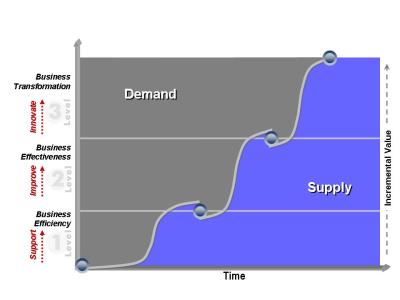
Business-IT maturity frameworkJust a thought….

My esteemed colleague Vaughan Merlyn currently is on a quest (under the heading of the BSG Concours project Reaching Level Three) to further develop the already very useful framework of business-IT maturity. This framework (which has been around in many different guises the last 15 years or so) describes three levels of business-IT maturity – a basic one (level one), where the business asks and IT delivers, a more advanced relationship (level two) where IT is seen as a partner by the business, and a very advanced one (level three) where IT provides a platform for innovation to the business.

Lately we have been discussing ways to refine this framework in light of new technologies that have come along, as well as doing case research on companies that have reached level three. One thought that struck me is that there is a lot of similarity between these three levels and Clayton Christensen’s three types of decision-making. In the excellent article Why Hard-nosed Executives Should Care About Management Theory (HBSP), Christensen and Raynor posit three ways of making decisions:

  • The Scientific Method*, which is expensive and slow, since it requires hypothesis formulation and proof. This method is used only on problems that are important and hard.
  • Pattern Recognition, where the decision-maker monitors many variables at the same time and recognizes them as falling into certain patterns. This method works well for most business problems – and is one reason why case-based research and teaching works so well when training managers to handle business problems.
  • Rules-based decisions, when you have boiled down the problem to so few indicators that you can automate the decision-making in the form of measures.

To me it seems that the level one relationship works for problems that are largely rule-based (hence a focus on measures, formal decision-making and benchmarking). The partnership model works for problems that lend themselves to pattern-matching – you need a forum of experienced business and IT executives to discuss the problem and arrive at the solution through associative reasoning. The third level could be seen as a forum for answering those questions – or uses of the technology – that are so new that neither measures nor prior art exists. What is needed is a creative relationship, a theoretical (or, at least, abstracted) shared foundation, and a willingness to commit serious resources to trying to do things that may turn out not be possible.

Viewed this way, the maturity framework becomes a desciption of what kind of conversations the CIO and the CEO has – and what kind of problems the business wants help with, and the IT department can adress. 

End laptop serfdom!

New article in ACM Ubiquity: Time to end laptop serfdom!

(available after the jump for the inevitable corrections and in-text links)… 

Continue reading

Carr on computers as current

Cover The Big SwitchNicholas Carr: The Big Switch: Rewiring the World, from Edison to Google.

In his excellent book Holidays in Hell, P. J. O’Rourke visits Future World (an attraction at Disney World) and says that it is "like opening a Chinese fortune cookie to read, ‘Soon you’ll be finished with dinner.’"

I get the same feeling reading Carr’s book (an advance copy) – it is well written, stylish and easily recognizeable like Disney World – and understandable to the masses. The main message of the book is that because of faster networks, computing will be centralized and made accessible like electric power. Carr even draws a line back to the history of electric power provisioning. All very well, we already see this happening with Google applications and Gmail. But I first heard this prediction in 1990, spoken not as a wild speculation of the future but as a likely and not particularly exciting outcome by my thesis advisor, professor Jim McKenney at the Harvard Business School.

The centralized and ubiquitous computing future Carr eloquently predicts is, in principle, a return to shared mainframes accessed over telephone lines, only cheaper and faster by orders of magnitude. The mainframe lost dominance to the PC because people wanted control of their own computing and their own data, so they chose a cheap, weak and unreliable computing platform over one that offered stability, performance (at least in the aggregate) and reliable backups. Otherwise known as a disruptive technology.

Many hard disk crashes and viruses later, a significant portion of the populace have not yet moved their files to Google Docs and are unlikely to do so. For that matter, I would venture that more information and computing is still done on mainframes than on Internet-accessible servers. That is not where the innovation is, true, but new computing platforms come in addition to other platforms, not as replacements.

So we will move into the Cloud, but for social computing, collaboration, and information lookup. People will still want their local storage and (at least perceived) local control. And will end up with a three-tiered personal computer architecture: Traditional centralized computers for transactional systems that demand global recalculation (like airline reservation systems), personal storage and processing for the very personal (where are you going to store those photos, you said?) and cloud-based computing for stuff we want to find and share.

Oh well. This is not news. I know Carr’s book is written for the great unwashed, and I admire his language and clarity of examples, but it is like Tom Friedman’s The World is Flat: If you have been reasonably awake and facing in the right direction the last 10 years or so, you will not find any surprises here.

And that’s a pity, for I read books for ideas, not for summaries. And this one, for all its elegance, had me dozing off more than switching on.

Desktop virtualization

Good, short primer on desktop virtualization over at Enterprise Systems.

Vaughan on IT maturity

Vaughan MerlynMy esteemed colleague Vaughan Merlyn runs a BSG Concours Institute project called RLT (Reaching Level Three), based on a three-tiered model of IT-business demand-supply relations. Here is a well-written posting on IT demand and supply in capital markets.

I like this way of doing "open" research, with some of the debate taking place over the public Internet. Makes me feel less lonely here up in the chilly North… Plus, it might, over time, make the research more visible and thereby bring others into the debate.

Why IT matters but is not discussed

David Robinson has a great perspective on why the “and technology” debate is so devoid of activity. The reason is that there is relatively general agreement on the outcome but disagreement on how to get there – and the latter discussion requires expertise.

Hence, technology policy issues are discussed by experts for experts. That may also explain why special interests have so much influence with the lawmakers and so little with everyone else.

A CASE of Oslo?

Microsoft is embarking on a multi-year strategy called "Oslo", offering a model-based approach to systems development.

To me it sounds a bit like what we used to call CASE tools, i.e., Computer Aided Software Engineering, only now done with SOA components. Upper CASE, come to think of it. I am all for it – it seems to me that for every new technology generation, from 3rd generation though 4th to OO and SOA, we need to rediscover ways to describe what we want to do and processes for converting description into implementation.

Plus ça change…

Videoconferencing with realism

HALO video conferencing 

John Batelle has visited HP and used their Halo videoconferencing lab, which looks pretty impressive. The hard part in that studio is not getting big screens and seeing the people talk to you, but to set up the cameras so that everybody there can see everyone else in the eye, i.e., that if the guy to the far right of the screens in the picture is looking at the woman to the far left, it looks to him and her as if they are looking at each other.

Video conferencing is one of those technologies that you wonder why never take off big-time, until you start using it yourself and begin to understand that the barriers to adoption are rather high. There are so many small details that you have to get used to, such as the fact that if the person you are talking to is not looking you in the eyes, that is not because he or she is shifty, but because they are responding to your picture. If you want to look honest and interested, you better learn to look into the camera rather than at the person you are talking to. Of course, then you can’t judge their facial expressions. Add latency, and you have a potential for very stilted and formal conversation until people get used to it.

I learned to use videoconferencing from a master: Doug Neal, research fellow with CSC and one of the world’s experts on this technology. Back when I worked for CSC we hade videoconferencing equipment at home and did a lot of meetings, sometimes with as many as 10 destinations (with the screen split in 9 and your own picture disabled, this worked fine.) We even established a system of signalling for the floor by waving, which broke down when my 5 year old daughter came into my office, sat in my lap and waved to all the people on the screen.

One effect of doing a lot of videoconferencing was that when you came out of your office and talked to regular people again, their immediate response to your talking to them was a bit startling…

Consulting as system and profession

Toppin, G. and F. Czerniawska (2006). Business Consulting: A Guide to How it Works and How to Make it Work. London, The Economist.

This is a useful but uneven book. Its main contribution lies in the development of a model called “the Business Consulting Ecosystem”, which describes the various entities in the consulting profession and how they interact. There are also good descriptions of how the industry has evolved over time and good interviews with many consultants and clients. I particularly liked chapter 11, which describes the markets for ideas and how companies try to capitalize on them, though that may be because one of the companies described is Index, which I worked for in the nineties.

On the negative side, the latter part (second half) of the book and the conclusions feel quite a bit like a Powerpoint presentation, with bullet points giving the outline and filler text added in. The book is also slightly dated, since it was published in 2004 and things have moved on a bit, though it does report on the transition to outsourcing and the increasing polarization between advisory consulting and implementation.

So, smart in parts, useful in general, but uneven when it comes to drawing decisive conclusions. Sounds like the consulting business.

Best CIO quote of the day

"Of all "C-level" positions, the CIO post remains the least well defined and the most prone to identity crises. "

(Nick Carr, summing up the Chris Anderson-instigated debate about "keeping the lights on" vs. "installing cool stuff".)

Not exactly news

Funny article about how users are creating shadow IT departments using gadgets and downloadable software to create productivity boosters deemed non-kosher by IT, who fears these invasions of their turf.

This has been a problem and a source of innovation forever – Digital Computer used to sell their computers as "engineering equipment back in the early 80s so that invidividual departments could get around corporate computing centre standards. Absolutely nothing new here.

Though, of course, with Google tools, downloadable software and cheap computers, you could actually end up having more processing power and LOCs than central IT, if you worked on it. Sobering thoughts for many CIOs, I bet….

(Via Slashdot.)